


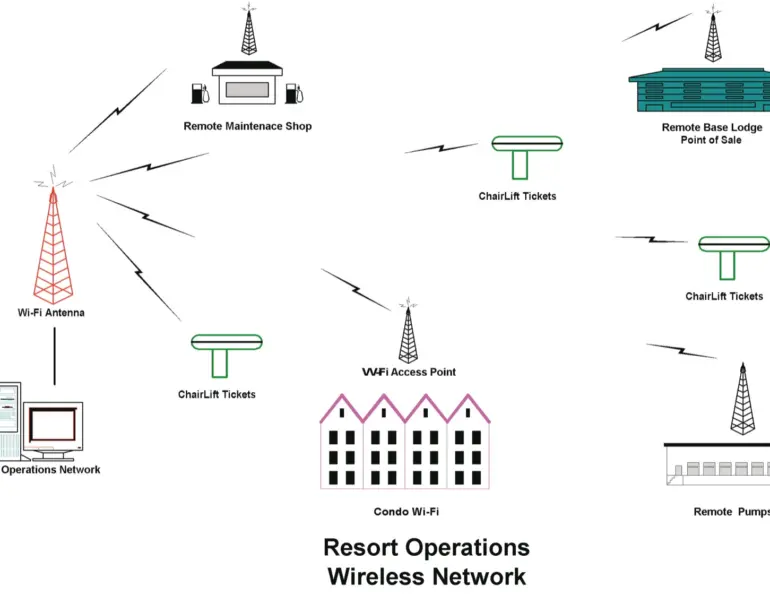
And it’s a pretty simple technology. A wireless network requires only three basic components: a small computer network (LAN), an Access Point (AP) device (such as a router or wireless bridge) and the wireless-enabled computing device (wireless-enabled means a Wi-Fi card is installed in the computer, laptop or PDA). The newer PC and Mac operating systems make the installation of the wireless hardware and software relatively painless. Communication within the Wi-Fi network is through a standard browser such as Explorer or Netscape. That is essentially all that is required for a small working wireless network.
The Payoff for Resorts
The possible applications for wireless technology at resorts are numerous:
- Remote restaurant cash registers and other points of sale can be integrated into the resort financial network.
- Ticket checking points with wireless IR scanners or RF readers can be added to the operational and marketing network.
- Grooming vehicle maintenance and other information can be downloaded during fueling or while on-slope.
- Lift operational information can be viewed by maintenance personnel with remote PDAs.
- Guest service personnel can be informed of specific issues and needs via PDAs.
- Results from special events such as racing and other competitive activities can be readily displayed and posted.
- Remote lifts and snowmaking installations can be monitored via the computer network or PDAs.
- Snowmaking systems and associated devices can be controlled through the SCADA system via PDAs.
Another intriguing wireless application is the creation of an Internet gateway for all the guests within a resort. This gateway would be accessed from “hot spots” created in specific areas around the resort and lodging network, just as MacDonald’s and Starbucks have done. This application can generate revenue and marketing exposure, by creating a separate gateway to the Web through a resort customized portal page and then sharing the access charges for this Web gateway service. (You can learn more about this at www.summitwireless.net.)
Test Case: Stowe
A real world example of Wi-Fi technology was installed this past winter on a test basis at Stowe Mountain Resort. The Stowe ticketing system uses bar code scanners that check ticket validation and send data back to the primary computer and software on the in-house computer network. Four Cisco AP units (that is, routers, like those available at any computer store) were positioned to blanket the Mansfield base area for this operational test. The results of this test were very favorable to the wireless concept; the AP units performed very well. The primary difficulty resided in the inability of the Infrared hand-held scanners to operate properly in colder temperatures, in particular the LED displays and the batteries—some additional hardware development is needed here.
Another example from Stowe was the use of wireless technology to connect a remote job-site trailer to the in-house computer network via a pair of point-to-point wireless antennas. This Wi-Fi application allowed the job-site personnel full access to important project information and enabled contact with other sources of data, including e-mail and the Internet.
Building a Resort Network
There are several issues to resolve in setting up wireless-enabled networks in the ski area environment. Wi-Fi networks can handle dozens, sometimes hundreds, of individual users. According to Wi-Fi guru Johannes Jobst of Summit Technologies.Biz (www.summitwireless.net) of Burlington, Vermont, a commercial AP device is theoretically capable of handling up to 1,024 simultaneous individual users at low and sporadic data transmission rates. Realistically, the threshold is more like 50 or fewer users while maintaining a high data transmission rate—less if several are in intensive use mode, such as streaming video. All it takes to mitigate that problem, though, is to add another identical AP device.
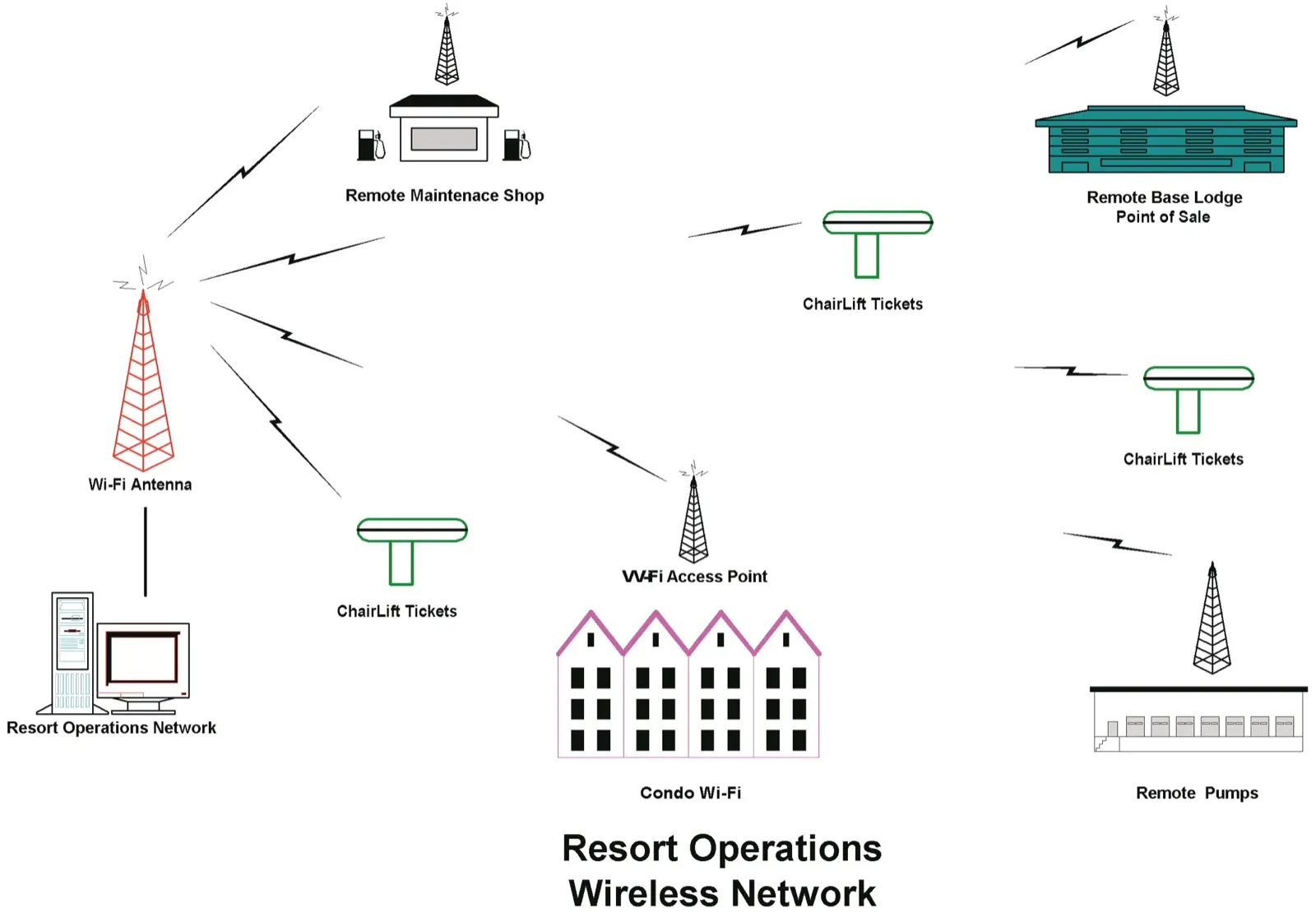
The maximum operating range for AP devices under ideal and unobstructed conditions can easily exceed 300 feet. A wide-open area, such as a base lodge, should provide excellent range and usability. However, in many office situations, concrete, cinder block, sheetrock and other assorted materials will shorten this range considerably and reduce overall data transmission rates. Again, the solution is often to add another AP device.
It is worth noting that as the distance to the AP increases, the data transmission rates decrease. With access points scattered over a wide area, the distance limitations of a standard AP device can be overcome with the proper installation of one or more phased array antennas. According to Summit, the company’s proprietary antenna will cover a range of more than two miles, although the company reduces this range to compensate for the effects of the extreme weather often experienced in the mountain environment.
The nature of mountain terrain and environment means that setting up these antennas requires some expertise. In designing a system, Summit first does a site survey to determine any physical and environmental factors that will affect the strength of the wireless connection, then creates a site map for all points requiring wireless connectivity, overlaid onto a digital topographical map. Then the company does a sophisticated computerized path analysis to determine the most effective placement and positioning for the antenna(e) to ensure the best possible signal coverage.
Since every mountain has a different topography and unique operational requirements, the path analysis becomes a vital procedure in determining the number of antennas required for a particular site. The physical length of the 2.4-GHz radio signal used in 802.11b/g Wi-Fi is very short (around 5 inches), and is not affected by extreme weather as much as longer length frequencies. Nonetheless, the transmission signal degradation from environmental factors must be taken into account to ensure that heavy snow, rain or (worst of all) fog will not affect the integrity of communications.
Sticky Wickets
If there are any obstacles to the Wi-Fi trend, they stem from the durability of hand-held PDAs and portable laptops and from security issues. However, PDAs and laptops with wireless capabilities have evolved into fairly sophisticated computing devices with some outstanding features for outdoor use. One PDA, the ToughBook 01 from Panasonic (www.panasonic.com/computer/notebook/html/01a01.htm), meets Mil-Std-810F testing standards. This rugged PDA, though pricey, will operate in temperatures from -20 F to 160 F and is 802.11b enabled. Expect continuing evolution on the ruggedness of wireless devices.
Security issues are also being dealt with. The majority of wireless devices have a range of 300 feet or more, and any outside device within this coverage area can intercept or enter transmissions within this radius. The old WEP security method for wireless, introduced in 1999, has proved to be not as secure as desired. This inadequacy has pushed IEEE to pursue the formation of a new security standard, 802.11i, that will be robust and able to meet government standards for security. This effort will not be completed until perhaps 2004, and therefore an interim specification WPA was established for current use. WPA is forward compatible with the new proposed standard and should provide the high level of security that enterprise and network administrators demand. The newer standard will address technical and arcane issues to provide the next level of wireless security.
The Bottom Line
Wireless technology is a rapidly developing means of remote communication between various types of computers and hosting networks. This technology essentially frees the individual and business from the wire tether and allows accessibility to remote data networks for exchange of information.
The Wi-Fi hardware and software is well developed and can be used now. Wireless should be a boon to ski resorts, given their far-flung sites and multiple points of sale and information sources that are difficult to access with conventional hardwire and telephone lines. Expect Wi-Fi to steadily infiltrate all sorts of applications in the ski resort environment as wireless transmission distances increase and the technology continues to evolve and mature.
Further resources and information on Wi-Fi can be found at www.PCMag.com/ wirelesslans and www.PCWorld.com. A www.Google.com search will turn up an extraordinary amount of information. Please feel free to contact the writer at [email protected] with your questions and comments.

Wireless (Wi-Fi) Terminology
Access Point (AP)—An electronic device (transmitter/receiver) that acts as a go-between interface for connection of a wired and a wireless computer network. Can be a stand-alone device or combined with a network router. Conforms to one or more of the wireless IEEE specifications.
Hot Spot—A wireless connectivity area serviced by an AP. Allows wireless enabled devices (laptop, PDA, etc.) to access remote computer network and Web.
IEEE (Institute of Electrical and Electronics Engineers) – National organization that sets common standards for computing and communications.
LAN (Local Area Network)—Several or more interconnected computers that can share and transfer information.
Mbps—Data transmit/receive rate in millions of bits per second, which is typical for wireless systems. For comparison, a standard telephone modem is rated at a maximum of 56 Kbps, or 56 thousand bits per second.
WEP (Wireless Equivalent Privacy)—an encryption algorithm based security method proposed by IEEE in 1999.
WPA (Wi-Fi Protected Access)—Interim security method that addresses WEP’s weaknesses and is compatible with new standard.
Wireless IEEE Specifications for LAN Technologies
802.11a – 2002 standard, operates in the 5-GHz radio frequency spectrum supporting data rates up to 54 Mbps.
802.11b – 1999 standard, operates in the 2.4-GHz radio frequency spectrum supporting data rates of 1, 2, 5.5 and 11 Mbps.
802.11g – New proposed standard, operates in the 2.4-GHz radio frequency spectrum supporting data rates up to 54 Mbps. Expected to be ratified summer 2003 and will be backward compliant with 802.11b devices.
802.11i – New proposed wireless security standard to be introduced later this year or in 2004.