


- “How do I decide whether I need a computer?”
- “Do I have to hire a programmer and computer operators—in short, a good-size separate staff?”
- “How do I go about getting a computer up and running?”
- “To what extent would I have to change my present methods?”
These questions are typical of any number that could be—and are—raised by ski area executives. There are answers to all of them; indeed, computer manufacturers, consultants, and adult education courses in a number of local colleges can all provide the information on which you can base your own decision.
SAM has chosen to provide some answers by example. Rather than “write at you” we travelled to Stratton Mountain in Vermont, where President Donald Tarinelli graciously agreed to share his knowledge and experience with us. Equally cooperative were Controller David L. Fielding, a key figure in Stratton’s successful computer effort, and Data Processing Manager Richard J. Watson who is also the systems analyst and programmer.
By describing the Stratton computer story, however briefly, on these pages, we will effectively cover the questions listed and, hopefully, more that may be on SAM’s readers’ minds. We will be talking not in theory, but about a real-life situation, and sharing with you the thoughts and conclusions of the people who got this system started and are using it today.
For those of you tempted to dismiss our story because “Stratton is too big for me”—Don Tarinelli decided he wanted a computer when he first took over at Stratton, in 1974, and the business was at the $3 million level. Today, it’s at $10 million annually, and looking forward to adding the neighboring, newly-acquired Bromley Mountain operation.
This is more than a “big area” story. It’s a growth story with applicability to any size operation aspiring to profits and growth. Don states that growth to this point has been significantly helped by the computer, which “gives me the information I need to run the business”—and that it would be all but impossible to add Bromley and operate the combined new enterprise efficiently and profitably, without it.
One more point before we begin: your correspondent can attest, on the basis of personal knowledge of computer utilization in general, that Stratton is on the “leading edge” of computer users—that their system is relatively advanced and they are doing things many others are still working towards. That does not mean their system is the “last word” or the only way of structuring a data processing facility to get what you want out of it. Other ski areas are using other equipment and perhaps somewhat different approaches, and still gaining a great deal in operational and decisionmaking support. As in anything else, it’s a matter of what you want and how you want the system to do it for you.
Stratton chose to follow a concept that calls, in effect, for “putting the business in the computer.” This can be grasped by studying the accompanying box headed Major Master Files, or Database, and the sample screen display Review of Stratton Operations.
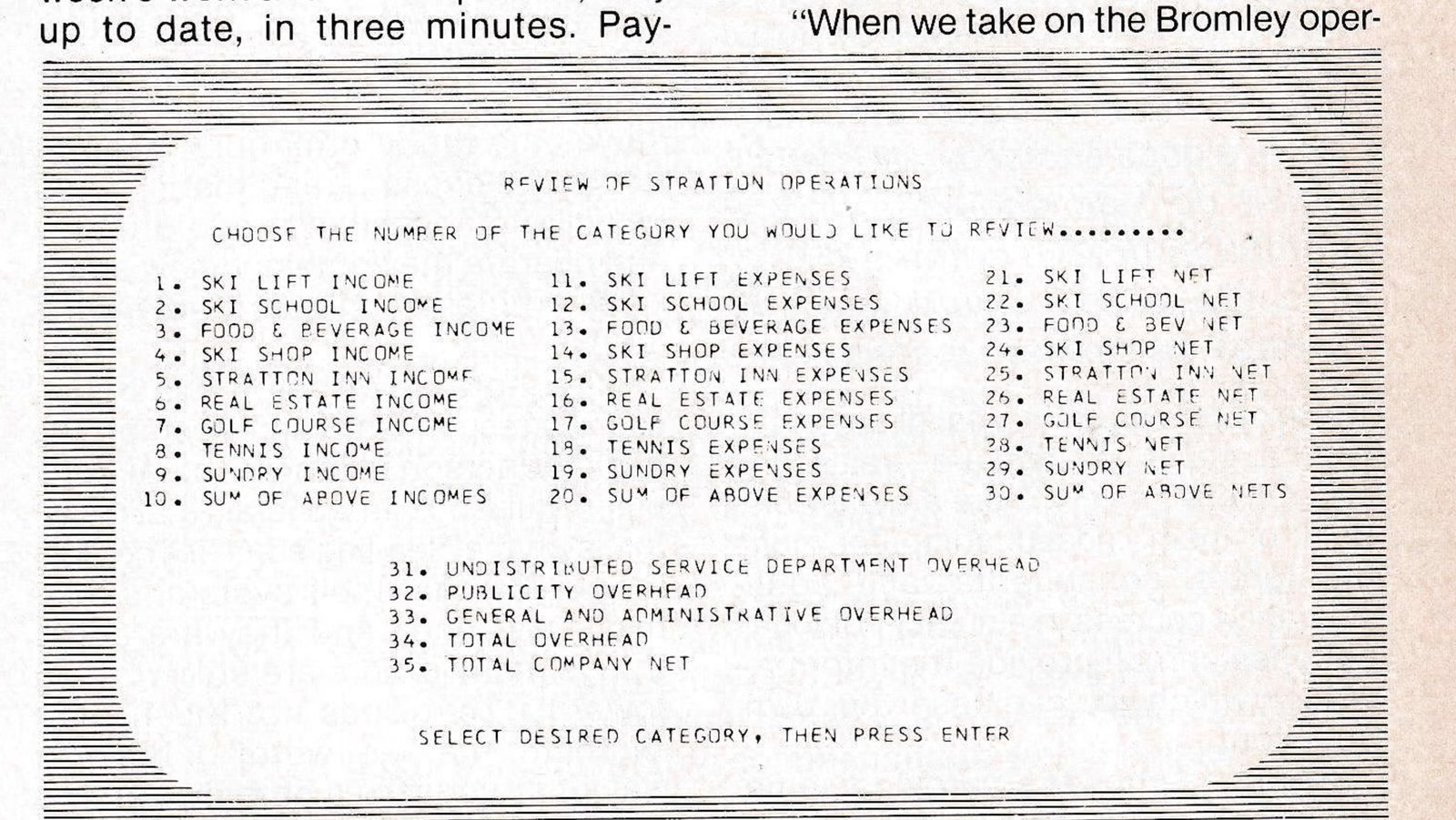
The database is an electronic file that contains all the information reflecting Stratton’s day-to-day income and expenses. It is the single, centralized operations file with which all authorized Stratton personnel interact. Management can find in this one location all the data it requires to monitor and control the business. in contrast with manual files which typically see one set of files for employees in one filing cabinet, another in the ski school for school operations, a third for lift tickets, etc. To put any of that information together requires going to all separate files, and the data can be no better than the most poorly maintained file. This is one of the main reasons ski area records are typically 45 days behind actual operations.
Dave Fielding notes that, “Everything in ski area operations is a derivative of lift ticket sales—the restaurants, ski school, equipment rental, ski shop, and so forth—so it’s essential to set up effective controls for the ticket inventory and know, day-by-day, how it’s selling.” He designed an online perpetual lift ticket inventory system.
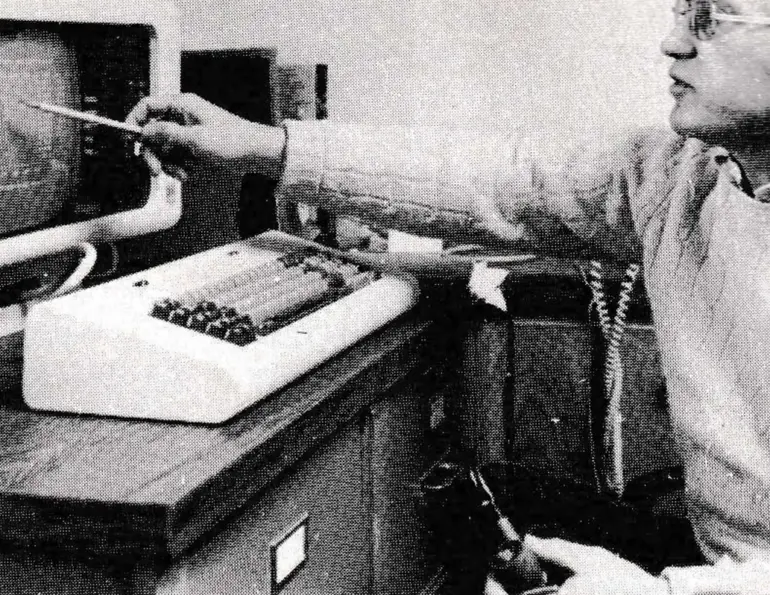
Online means devices like the visual display terminals are under the direct control of the computer, more particularly its program of instructions, and the person using the device can interact directly with the computer and its stored information. Dave explains that previously they used a posting machine to record ticket inventory, and were constantly “playing catchup” to post prior days’ sales; since they seldom caught up, they could not develop good statistical information.
“In practice, we really did not know our ticket inventory position until some time after the end of the season,” he says. “This is an exposure that can involve considerable sums when you remember one roll of all-day adult tickets is worth about $18,000.”
Now, each roll of tickets, with all relevant data, is “filed” in the computer. Every day, tickets are sold in upwards of 12 different locations. At 4:30 p.m., after the days’s skiing has ended, the ticket sellers report into the Cashiers Department the beginning and ending number of every ticket sold, in each category, along with any that were voided, and coupons. The Cashiers Department double-checks the data for accuracy, and reports this information to Data Processing (DP).
The following morning, a DP operator sits down at a terminal, and “calls up’ a screen display specifically designed—in a program written by Rick Watson—to help enter information into the system with a high degree of accuracy (sample screen headed Input to Sales and Inventory System).
The technique is known as “interactive processing”. The operator tells the system what he or she wants by entering command codes through the keyboard; the system responds by displaying the data requested, in this case the data or input entry screen.
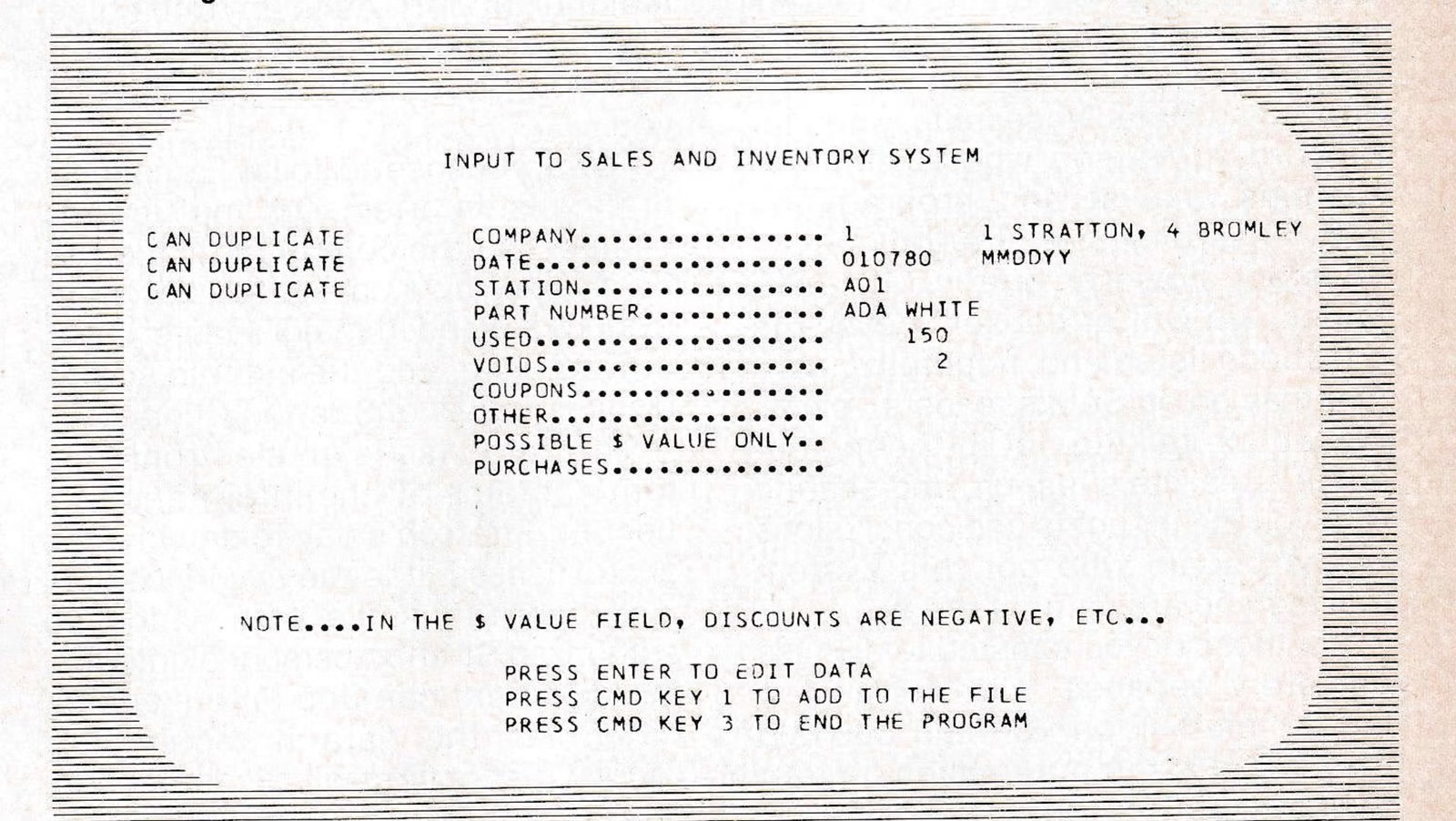
The screen calls for entry of information in a given sequence, and the operator follows that sequence. The system automatically checks the data entered for accuracy; for example, if the operator entered a date in 1982, or a lift ticket number that doesn’t exist, the system would “know” this was incorrect, refuse to accept the entry, and bring it to the operator’s attention by highlighting the incorrect entry right on the screen.
“Not only do we get the ticket sales information in fast, we know it’s ‘clean”, says Rick Watson. “Fast operations wouldn’t be worth much without assurance of accuracy, and we have that assurance.”
By noon-time, all the prior day’s ticket transactions are in the system, and these can total upwards of 2,000 on weekdays and 5,000 on weekends; during the season the computer operates seven days a week. Since the database contains a complete breakdown on each category of ticket, including price, all the system needs to develop item and dollar totals is the quantity sold in each category and any that were voided.
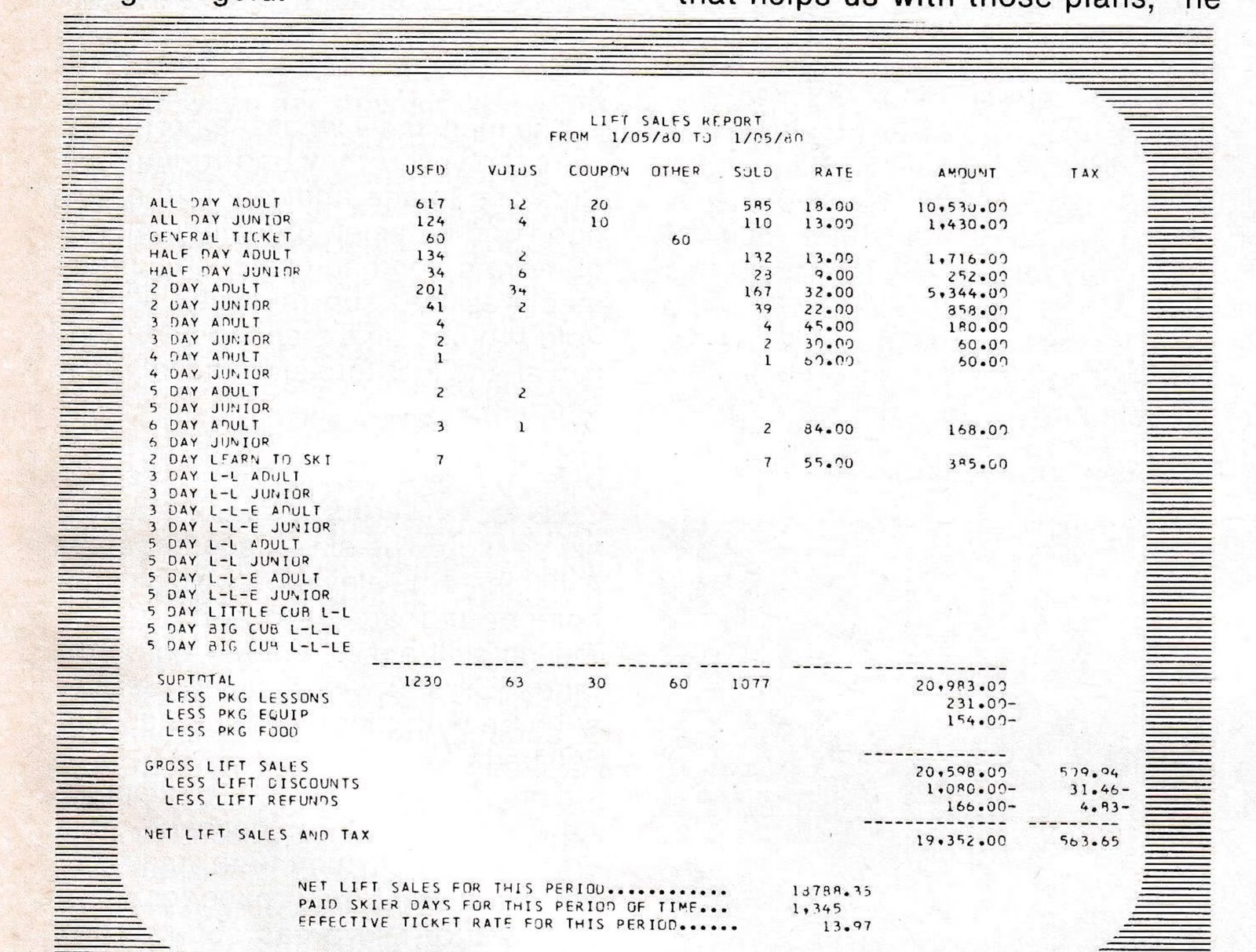
A Daily Lift Sales Report (see sample screen) details the day’s activities right down to net lift sales, paid skier days, and the effective ticket rate. The latter, of course, is a focal point for management, which sets that rate at the beginning of the season in anticipation of business to be done. Management can see the relevant figures for any consecutive daily period from the beginning of the season to date, so that the effective rate is monitored daily, weekly, monthly, and season-to-date.
The system handles every component of Stratton operations in essentially the same manner. Income from the ski school, shop and restaurants is reflected in the general ledger, which also accumulates data on expenses. So at any time, by tapping keys on the terminal keyboard, management can get the very latest information on each of the expense and income areas listed in the Review of Stratton Operations sample screen, including cumulative to-date figures. Note that it includes summer operations, real estate income and expenses, and a total company net “bottom line”.
Some Specific Benefits
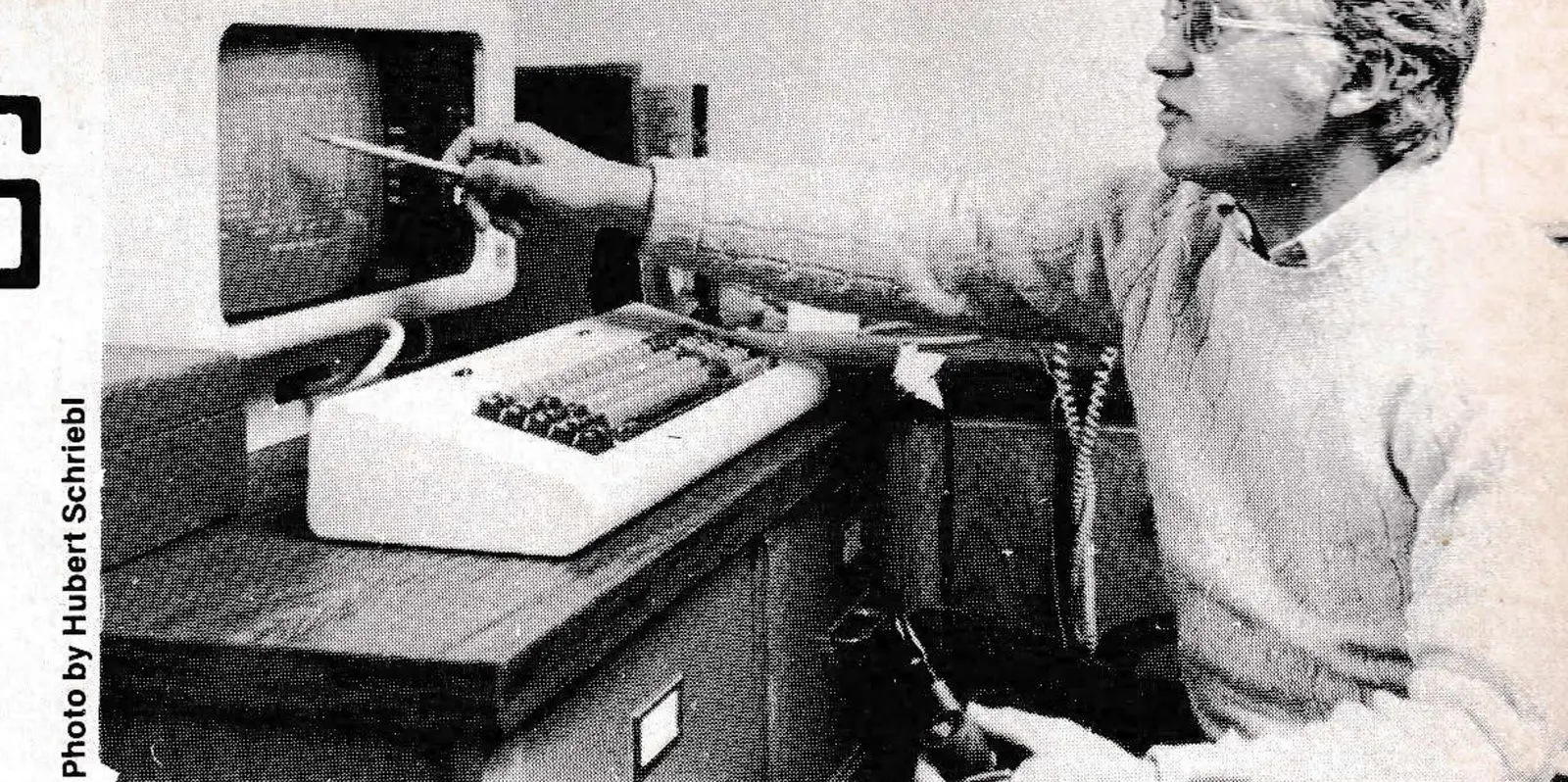
Photo by Hubert Schreibl
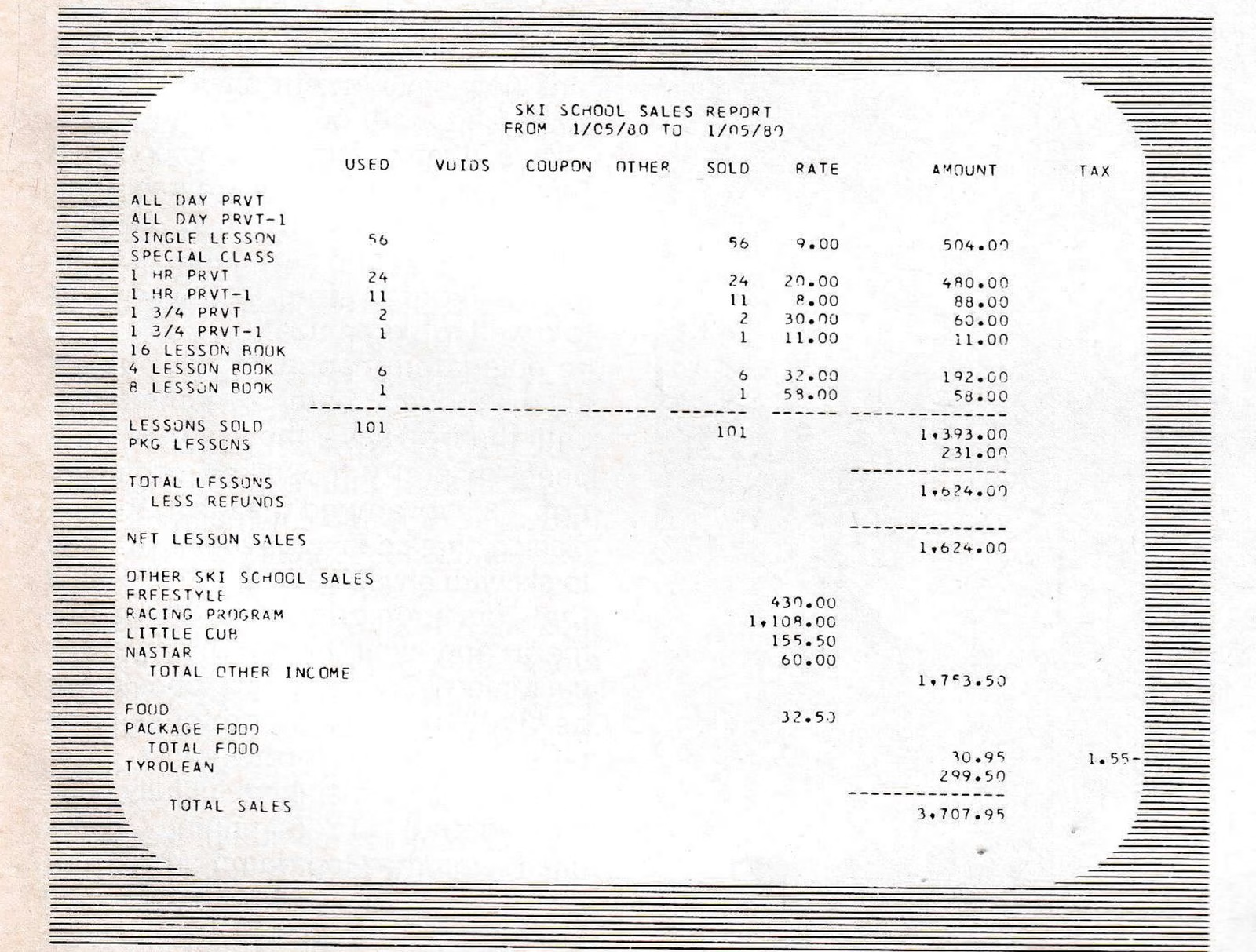
Emo Henrich, ski school director who has been with Stratton since the area’s inception 19 years ago, says the system has enabled him to shift from decisions based on intelligent guesswork to decisions based on facts.
“I could never get the level of detail that’s available now because Accounting could not handle the workload fast enough,” he says. “I was never able to get year-to-date season figures, but now I get breakdowns on all school operations right up to date. It makes the overall operating ‘picture’ much clearer, helping me do a much better job.”
Rick Watson reports a range of improvements like plant ledger preparation, which used to require a solid week’s work and is now printed, fully up to date, in three minutes. Paychecks, reports, and many other documents are also printed automatically, at high speed and with computer accuracy. Income and expense information, by department, which used to be 45 days behind the fact, is now about 12 hours “late.”
Dave Fielding notes that with computer support, the 500-person payroll is handled by just one clerk. “Since the computer came in, we’ve added four people in this office including DP personnel,” he says. “We’re handling an increased work volume that would otherwise have required about 14 people. Over and beyond the straightforward payroll savings, there is the question of where we would have housed such an administrative staff. We are handling more and better work, which means we’ve made the office much more productive.
“When we take on the Bromley operation, we will immediately become a $15-million plus operation, and expect to absorb the new workload with no major staff additions,” he adds. “That means we will go on ‘multiplying’ administrative savings— and that’s just one side of the coin. The computer is not just a financial tool for us; it is now an operations support vehicle. There’s really no way of putting an appropriate price tag on it. In my experience, it’s worth its weight in gold.”
Don Tarinelli feels the computer investment pays for itself in the area of management decision-making alone. “We’ve just begun to scratch the surface of what we can do now that our operating data is in the system,” he says. “My primary concern at this moment is the poor season we’re having, and the effect it will have on our plans.
“We have just started playing the ‘What-If’ game, a computer simulation that helps us with those plans,” he says. “We have data on skier days, income and expenses right up to date, so by projecting different conditions we can get an insight into what we can expect.”
Typically, the “game” goes like this: the computer is told that from mid- February through to the end of the season, skier days—running very low because of the lack of snow in New England—will pick up and stay at a high level. Given that situation, and taking into account what’s happened since November 1979, what will Stratton’s cash position be as summer approaches? Or, the system is told to project total season income if skier days continue at the same depressed level. Don expects to run these simulations weekly, right through to the end of the season.
“The sooner I can determine what our cash position will be, the sooner I can decide what we will want to do with our current capital plans,” says Don. “If we’re going to have to borrow money, the sooner I have a good idea what kind of money we will need, the sooner I can begin making arrangements, and the better the deal we can hope for.
“This kind of forecasting can’t be exact, of course, and will never remove the human element from the final decision,” he adds. “l’ll still be responsible for whatever I recommend to our board of directors. But I will have a far better insight into what is likely to happen, and that’s much different than pure guesswork or waiting until the last minute.”
“How do I decide whether I need a computer?”
Let’s turn, now, to the computer-related questions.

Prior to taking on his present job, Don Tarinelli had his own building construction firm. He is, as he puts it, “a numbers-oriented person who’s always looking for all the insight I can get.” He had a small IBM computer then, and when he came to Stratton he knew the computer could be a valuable tool.
Don had previously gone through the experience of learning what he could about computers, to be able to make his own “install decision.” IBM has a complete range of study courses including executive familiarization classes; other manufacturers also have them, as do associations like the American Management Association, and many are designed specifically for smaller businesses. Courses are also available in many community colleges, and the adult ed curricula of a number of universities.
It is part of the human condition to look for simplistic answers, like: “If you’re doing $25,000 a year or more
Photo by Hubert Schreibl
you can afford a computer.” The thought of a $25,000-a-year gross income ski area operation is patently ridiculous; any attempt to reduce the “install” question to such a statement would be equally ridiculous.
I made the point in January SAM, in the first of this series of articles, that the cost of computers is so low even the smallest ski area could put one to good use. That statement is still valid. The only question is whether you’re willing to invest the time to determine for yourself how, and to what extent, the computer investment could pay off.
“Do I have to hire a programmer and computer operators?”
The specifics of installing Stratton’s computer became Dave Fielding’s responsibility. He is an accountant by profession and had already accumulated some knowledge about computers.
Dave took some IBM courses, sent one of his clerks to IBM school to learn to operate the computer, and hired another person with experience as an operator. For professional programming assistance, he called on Rick Watson—who has a degree in computer science—on a moonlighting basis. Rick did not join the Stratton staff fulltime until June 1979.
There are computers designed to operate in what is called a “programmer-less environment”—a fancy term for saying you don’t have to hire a programmer. In many cases, small businesses buying or renting such computers send one or more of their clerks to computer school, and they become the operators. The software, or program of instructions, are “nackaged” and ready to use. Some may need some alterations to fit your specific needs.
“To what extent would I have to change my present office methods?”
That depends, but the day when office methods had to be “bent” to suit the new system has long since passed. Now, computer manufacturers make a point of the fact that their hardware and software can be tailored to your needs. The key point is that the typical computer system is not inflexible. On the contrary— note, by checking again the sample screen called Review of Stratton operations, how the business is very neatly encompassed in the system.
“How do I get a system up and running?”
Once his computer decision had been approved, Dave Fielding decided to rent three program packages— general ledger, accounts payable, and payroll. The cost is about $100 a month for each package.
“You can write your own programs, but to develop what we got for about $300 a month would take a professional programmer a solid year’s work, and all told would cost in the $40,000 range,” says Dave. “We avoided that big initial cost, and got started without having to wait for programs to be written. As part of their rental fee IBM allows 75 hours of ‘free’ machine time at their nearest Datacenter, which, for us, is in Burlington, Vermont. So before the computer arrived we had made the changes necessary to ‘customize’ the packages for us, and had our software ready to go.”
Dave states the payroll required the most customization, and that came to only about 10 percent of the entire package. Stratton has different types of payrolls, such as one for the Inn and another for restaurants, and the changes were needed to reflect the differences between payrolls.
“It was no big deal,’ he says. “A major reason I recommended IBM is that they have an excellent reputation for holding your hand during installation, as well as for service. Now, we’re developing our own programs, including our own general ledger and payroll systems, in part because we want to be independent of IBM.”
When the computer arrived, Dave and his two operators followed the step-by-step manual that came with it to get the system up and running within 24 hours.
Major Master Files, or Database
**Lift Ticket Inventory.** This file contains the starting and ending numbers of each roll of lift tickets with which Stratton begins the ski season; the price of each type of ticket; the total of tickets in each category sold to date, coupons used, total tickets voided, and grand totals; net number of tickets purchased by date, and cumulative to-date totals.
**Daily Ticket Sales File.** This accumulates information on every lift ticket sold for the day, quantity, type, and “color”—dailies, “package” tickets, ski school lesson tickets, adult, junior, etc.—with cumulative totals from the beginning of the season to date.
**Employee Master.** All necessary data includes names, addresses, department where employed, payment rate, deductions for tax purposes; covers some 500 people, “expanding” and “contracting” as the business cycle requires.
**Accounts Receivable.** Names, addresses and related information on about 1500 individuals with charge accounts at facilities including the Stratton Mountain Inn, cooperatives and over 200 homes on the Mountain with full service, and the ski shop; complete details on charges outstanding, open accounts owed and how long, statements issued, year-to-date payments, etc.
**Accounts Payable.** Names, addresses of each vendor, details on each payable item; open payables, total open commitments to date, details on items ordered and delivered to provide data on vendor performance.
**Plant Ledger.** This covers all fixed assets, 1,000 separate items including buildings, lifts, snowmaking equipment, etc. with related cost and depreciation figures.
**General Ledger.** This is the chart of accounts file, accumulating income and expense data by department and/or activity, and reflecting the status of the business. A temporary file accumulates the information daily, so that at any point in time balance sheets, income, expense, or profit and loss statements can be printed. The month’s general ledger is formally closed when all vendor bills for that month have been received.
This information is maintained (the computer term is “resides”) within the System/34, on magentic disk files, where it can be accessed directly. The System/34 contains 24.5 million bytes, or characters of computer information, which can be readily expanded. Additional information can also be kept on Diskettes. These are lightweight electronic files distantly related to, but smaller than, phonograph records, with varying capacities; typically, a Diskette can contain as much as 256,000 bytes. When the data on a Diskette is needed, it is placed in the computer, read into the computer’s internal memory and utilized as required.
The information within the computer is accessed—or “taken out of file”—by way of visual display terminals. The Stratton equipment configuration includes six 5251 terminals, one in the accounts receivable department, one in President Donald Tarinelli’s office, and three in Data Processing. By entering commands through the terminal’s typewriter-like keyboard, information is “accessed” from file and displayed on the screen; then, under control of the system’s program of instructions, any necessary changes are made. Paychecks, reports, copies of terminal displays, and other documents are printed on the system’s final major piece of equipment, the 5211 printer which operates at 300 lines per minute and is located in Data Processing.